Tara AI Email Insights
UXCam is a leading mobile app experience analytics platform. Tara is UXCam's AI product analyst: it autonomously watches session recordings, surfaces friction points, and delivers evidence-backed recommendations.
My role: Product strategy, insight-quality evaluation framework, cross-functional coordination

Executive summary
Session replay is UXCam's core value proposition, and customers relied on it heavily, but the depth of insight hidden inside all that data was going largely untapped. The platform captured comprehensive session data, yet customers rarely had the time to manually comb through hundreds of replays to find the meaningful patterns buried in them.
Tara, an AI module capable of watching session replays and surfacing product insights automatically, was built to close that gap. We designed an automated email sequence that proactively surfaces Tara-generated insights, backed by real session evidence, directly to customers' inboxes. The goal was simple: let customers experience what Tara could do for them before asking them to go find out for themselves.
I owned the product strategy, the evaluation framework that defined "what counts as a good insight", and the cross-functional coordination between design, AI engineering, and front-end, partnering closely with a dedicated AI engineer who built and tuned the generation and judging pipeline against the criteria we defined together.
The problem
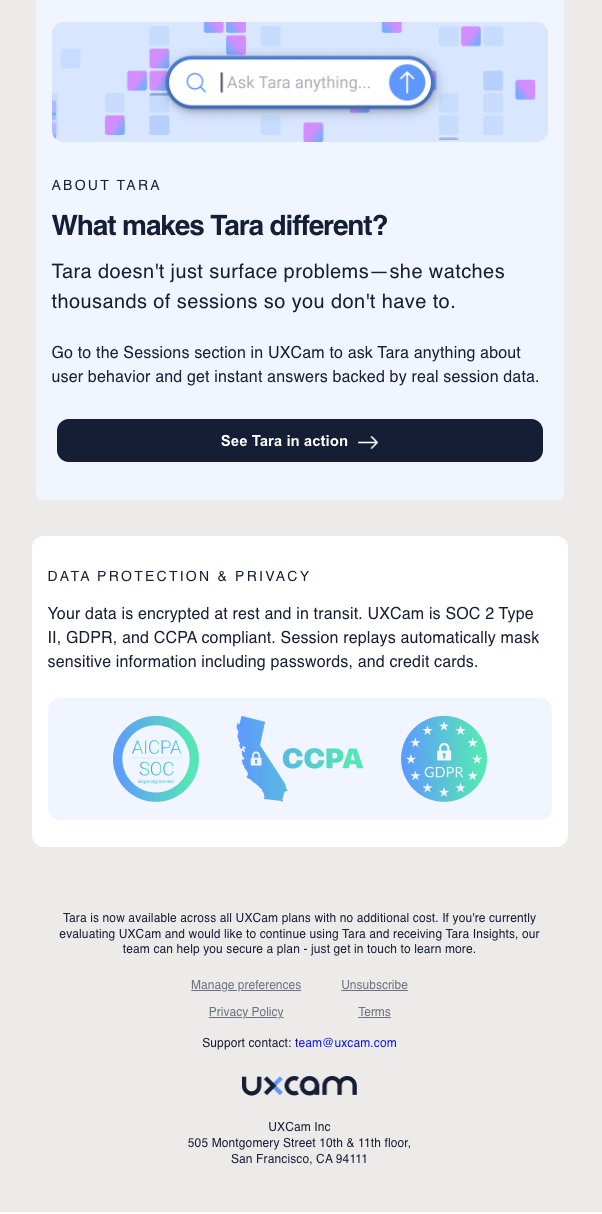
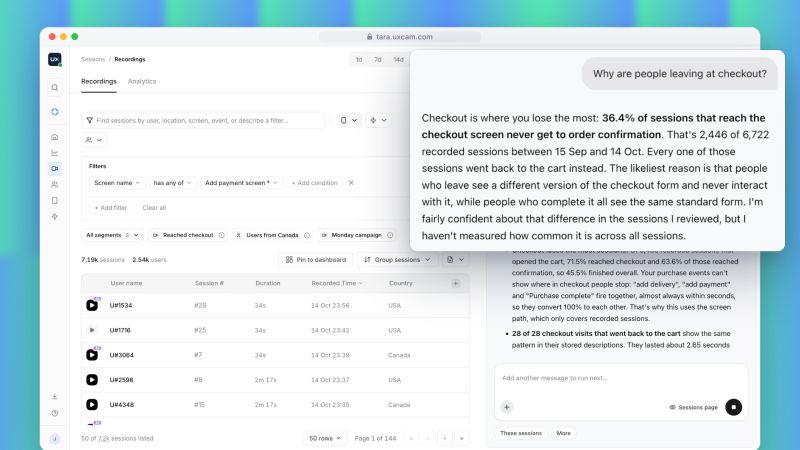
UXCam's core product captures session replays: screen recordings and gesture data across a timeline of how real users move through a mobile app. Tara sits on top of that data and can answer qualitative and quantitative questions about user behavior. But awareness and adoption were low: customers had to know to ask Tara something, and most didn't know what to ask.
We needed a way to demonstrate value with zero effort from the customer, surfacing something Tara had already noticed in their own product data, on a recurring cadence, so the insight itself became the invitation to explore further.
Approach
1. Grounding insights in real product data
Every UXCam customer account can contain multiple "apps": separate iOS and Android builds, or separate dev and production environments. Each app independently records session replays once the SDK is integrated, capturing three layers of data per session: a timeline, screenshots of app screens, and gesture data (type and coordinates). This per-app session data became the raw material Tara would watch and generate insights from.
2. Email sequence
I scoped the sequence around a few core product decisions:
- Per-app, not per-account. Insights are specific to a single app's data, so a customer with both a Dev and a Production environment set up as separate apps receives separate, relevant emails rather than one blended one.
- A 30-day rolling window. Insights are generated from the last 30 days of sessions so that what a customer sees is current and hasn't already been resolved.
- A minimum evidence bar. An app only enters the sequence once Tara has watched at least 100 session replays for it, the threshold most likely to produce insights backed by a broad, meaningful sample rather than a fluke from a handful of sessions. New customers have every session replay watched by Tara automatically, up to that threshold, as part of onboarding, and Tara continues to watch sessions daily.
3. Designing the emails
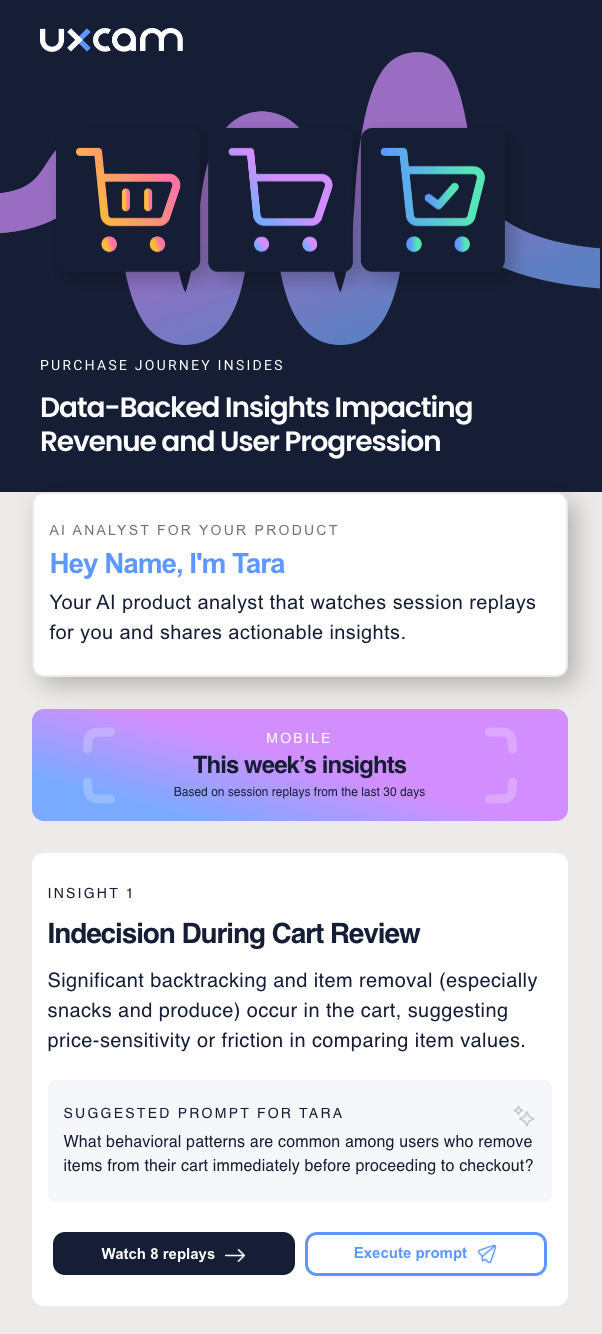
I collaborated with the designer on the email templates, aligning them with the product's new branding. We built five templates, each scoped to a distinct part of the mobile user journey where insights are highest-value:
- Error messages
- Key user journeys
- Sign-up flow
- Purchase flow
- Transaction flow
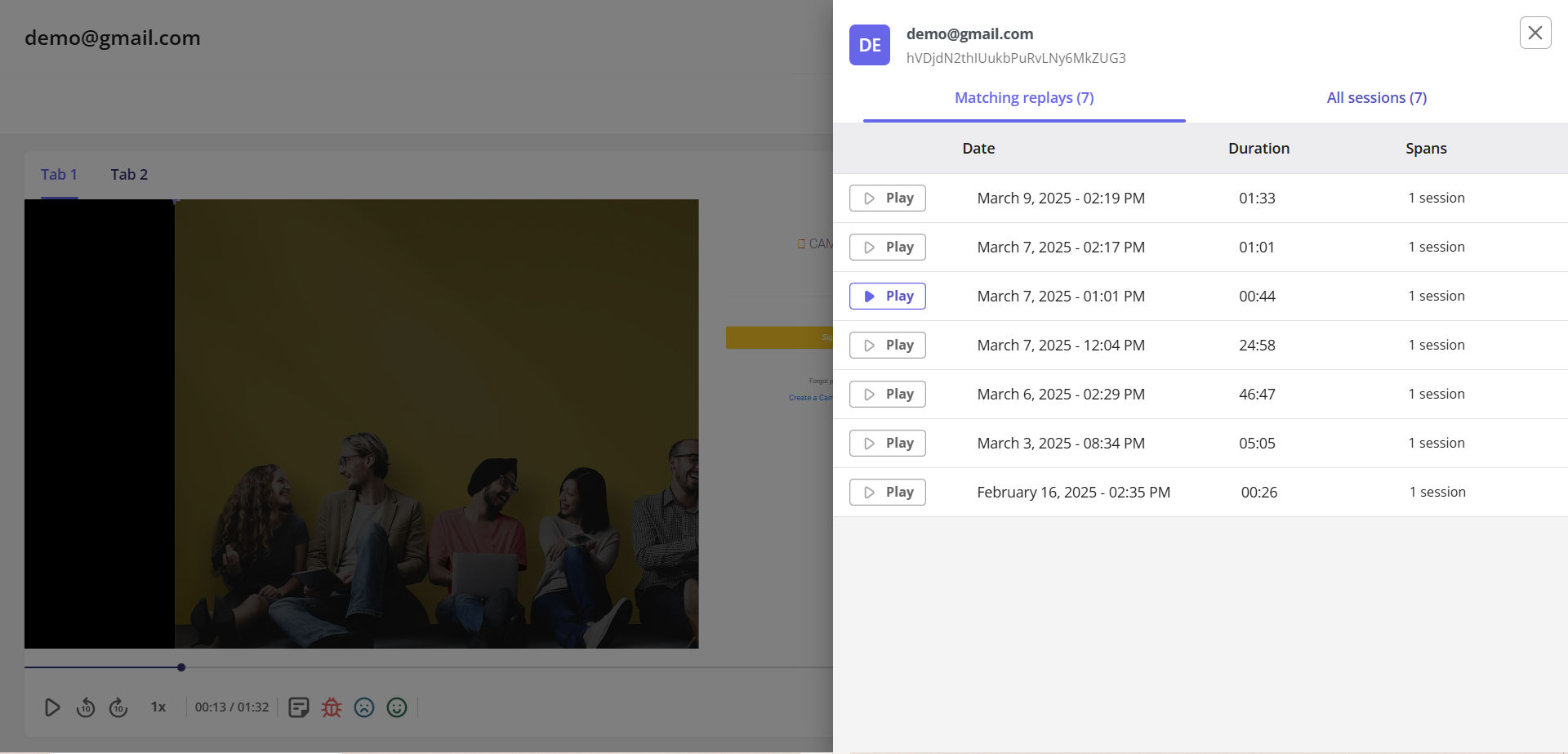
Each email surfaces three AI-generated insights, each backed by the actual session replays it was drawn from, with two calls to action per insight: watch the underlying session replay, or jump into Tara to investigate further with a suggested, tailored prompt.
4. Eval loop
Behind each email is a retrieval-grounded pipeline, with a judge acting as a hard quality gate before anything reaches a customer inbox.
- Retrieval. Every session replay Tara watches (timeline, screenshots, gesture data) is transcribed and embedded into a vector database as it's processed. When an enrolled app comes up in the send cadence, the generation prompt queries that database for the app's most relevant session data from the last 30 days, so insights are grounded in real session evidence rather than the model's own memory.
- Generation. Tara takes the retrieved session data and generates insights, returned as structured JSON, each insight paired with the session replay(s) it's drawn from and a suggested "deep dive" prompt.
- LLM as a judge. A judge wraps the generation step and evaluates the JSON against an explicit set of pass/fail criteria before anything moves downstream (see below).
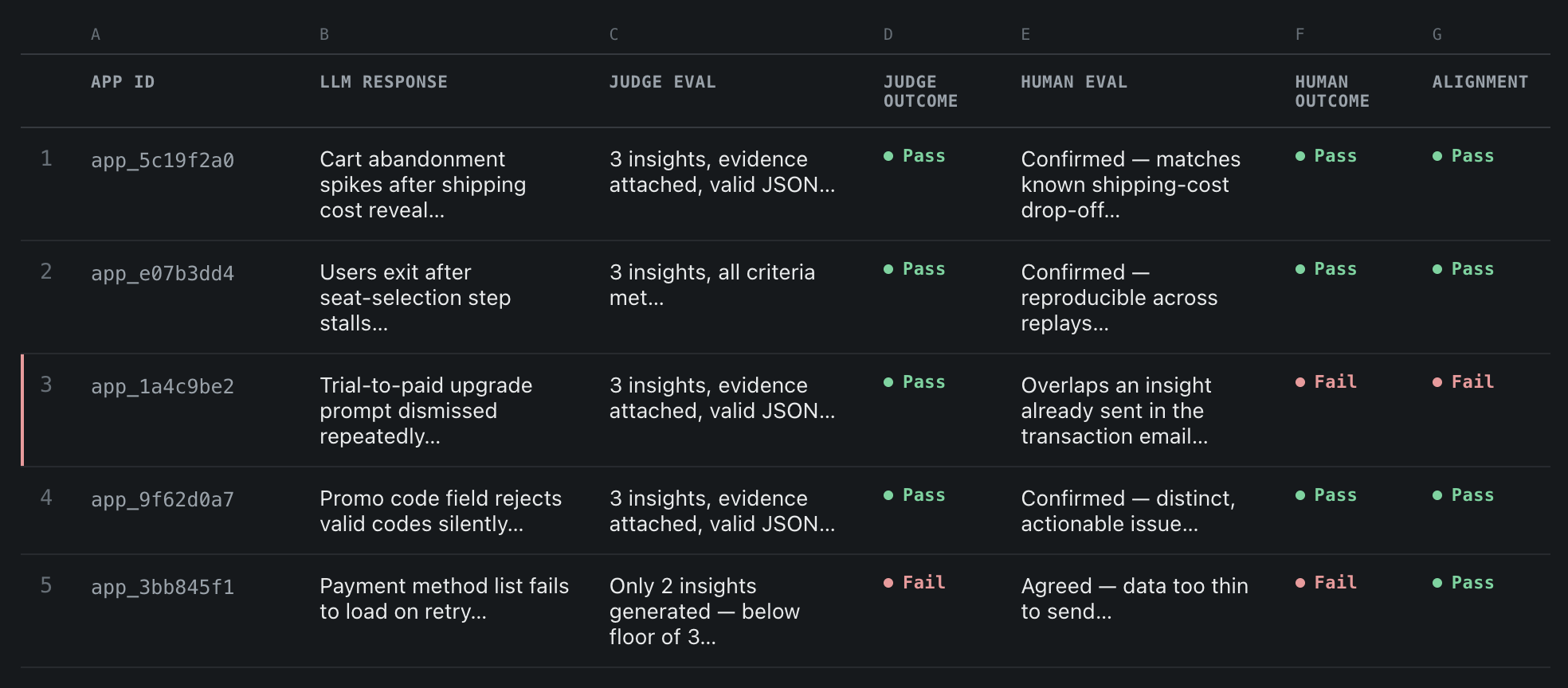
- Human in the loop. The non-deterministic criteria require judgment calls, so judge output was validated against manual review on a sample of apps, with evidence, generation, judge verdict, and manual verdict tracked side by side.
If the judge rejects the output, the pipeline loops back through retrieval and regeneration, up to 5 retries per app, before the app is skipped for that cycle. Only a payload that has passed every criterion is handed to the front end, with each insight's supporting criteria and evidence traveling alongside it, so the front end can populate the email template directly without a separate lookup step.
Judge criteria
- Deterministic: the app has at least 100 sessions watched by Tara in the last 30 days.
- Deterministic: at least 2 insights are returned for every call.
- Deterministic: every insight has at least two attached session replays.
- Deterministic: every insight has a suggested "deep dive" prompt.
- Non-deterministic: every insight surfaces a user pain point that is helpful and actionable.
- Non-deterministic: every insight is relevant to the email template theme.
- Non-deterministic: the suggested prompt is directly related to the insight.
5. Evaluation methodology
To validate quality before wider rollout, I ran a structured evaluation process:
- Selected a small, representative sample of UXCam apps.
- Sent the generated emails internally and had the product trio and CS manually review the insights for relevance and accuracy.
- Built a comparison log tracking, per app: the prompt used, the raw LLM output, the judge's evaluation, and my manual evaluation.
- Used the gaps between manual and automated judgments to iteratively tune the prompt, the judge's criteria, and the underlying model, repeating until judge and human evaluations converged on accuracy and usefulness.
6. Fine-tuning
Three distinct issues surfaced during development, one requiring tuning of the LLM itself and two requiring tuning of the prompt.
- LLM fine-tuning. UXCam masks sensitive on-screen data with black or red placeholder screens and containers at the SDK level. The model needed to interpret and respect these masked screens, recognizing them as intentional privacy redactions rather than content to flag as an issue.
- Prompt fine-tuning. Purchase-flow and transaction-flow emails initially surfaced near-identical insights, since the two funnels overlap and the session replay transcription matches both. The prompt now explicitly excludes insights already covered by the other email type, so a customer doesn't see the same finding twice, a week apart.
- Cost fine-tuning. Early prompts left the expected output open-ended, so the model over-generated: restating session context, hedging, or padding insight text well past what the judge or template needed. We tightened the output contract with a stricter schema and explicit length guidance per field, reducing tokens per call without losing any evidence the judge checks for.
Product trade-offs
Duplicate sends from timezone-batched delivery
During a pilot send to a small group of UXCam customers, we caught a bug before it could affect a wider rollout: some customers were receiving the same insight email multiple times.
Emails were sent in batches grouped by recipient time zone, so every user received their email at their own local 10AM. The root cause was how the send trigger handled bounces within those batches: retry logic was scoped to the entire time-zone batch rather than the individual recipient who bounced. If even one email in a batch bounced, the trigger re-sent to the whole batch, so customers who had already received it got it again.
Fix: we disabled automatic resend-on-bounce and instead excluded bounced addresses from that cycle.
We accepted ignoring bounced recipients as a reasonable trade-off over building targeted retry logic: a bounced address most often indicates a stale account, such as someone who left the customer's company and was never removed from UXCam's user list, rather than an active customer missing a valid insight. The cost of skipping those addresses is low, and it avoids reintroducing the batch-level resend behavior that caused the duplication in the first place.
One email per app, not per account
During scoping, we found that roughly 20% of UXCam accounts have more than one app. On the surface, that looked like a strong argument for consolidating multiple apps' insights into a single email per customer. Digging further changed the call:
- Most of those secondary apps weren't actively used or in production, so bundling them in would have diluted relevance for the primary, active app.
- Where a customer did run multiple genuinely active apps, they were often distinct products, so separate, app-specific emails kept each insight relevant to the right context.
We deliberately chose not to build a consolidated, single-email-per-account experience for this first version. One or two customers raised it in CS calls, but the data didn't support the complexity given how few accounts would meaningfully benefit, and per-app emails preserved relevance for the accounts that mattered most.
Final thoughts
This project turned Tara from a tool customers had to remember to use into one that proactively demonstrated its own value. By grounding every insight in real session evidence and gating output behind a deterministic-plus-judged quality bar, we put AI-generated findings directly in customers' inboxes with confidence they'd hold up to scrutiny. A 42% open rate, 26% click-through, and an 8% lift in Tara chat usage bore that out.
The build also validated two working principles for shipping AI features into a live product. First, product decisions like scoping (per-app vs. per-account) and failure handling (bounce logic) matter as much to the customer experience as the AI pipeline itself; the right call often means deliberately not building the more "complete" version. Second, rigorous evaluation, a structured loop comparing prompt, raw output, judge verdict, and manual review, is what made it possible to trust AI-generated content enough to send it unsupervised, and was as core to the deliverable as the generation pipeline itself.